Assembly Procedure Using Golden Pose
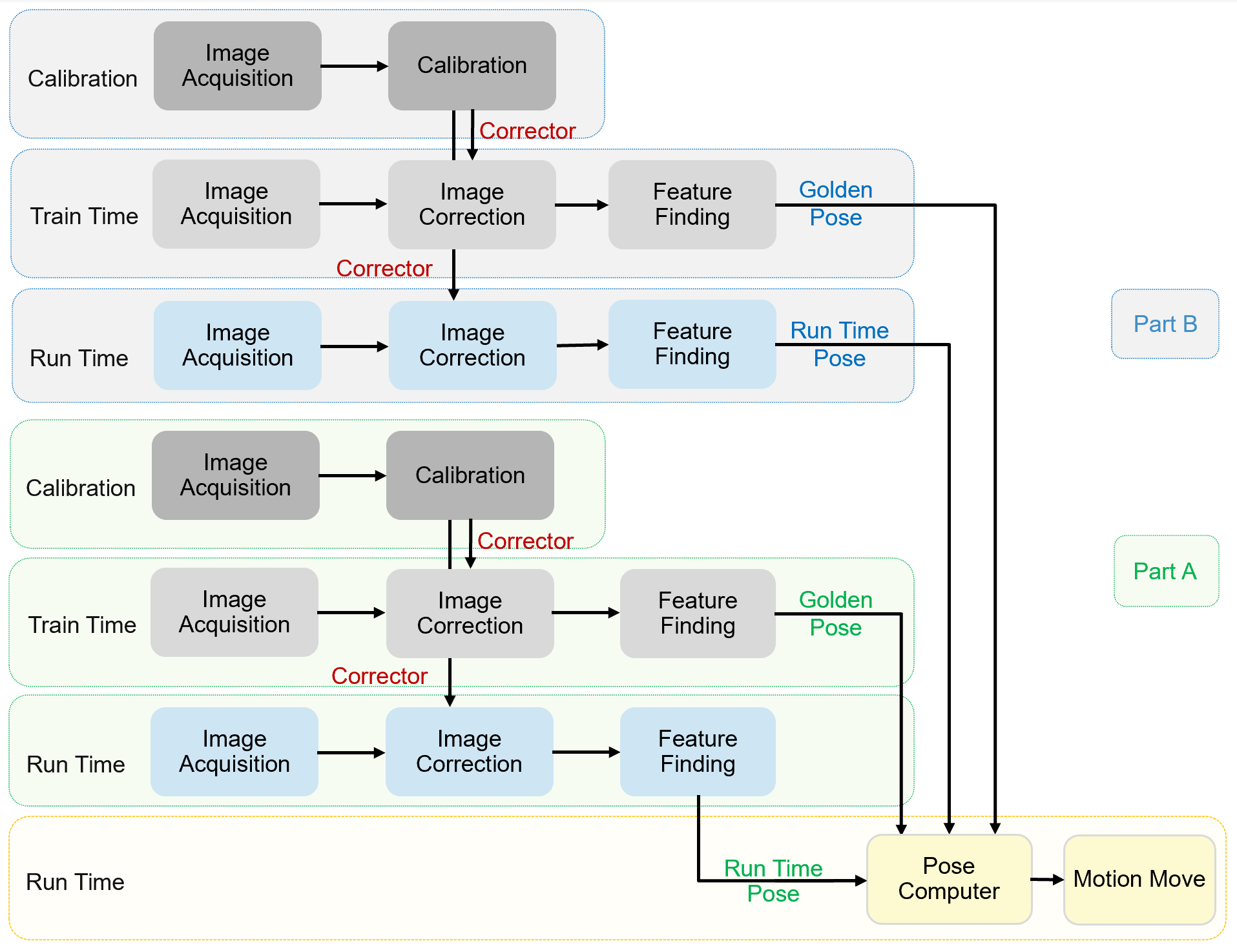
When Golden Pose mode is employed, assembly applications have three process steps for each part: (1) Calibration, (2) Train time, and (3) Run time. During the assembly operation, the vision system will take both part's run time pose and golden pose into consideration to calculate a pose one/two stage(s) should move, to bring two parts to desired assembly pose.
Calibration
During calibration, both stations run a separate calibration process first, then vision system unifies the two calibration results to create a shared coordinate space for all cameras and all motion devices. This shared coordinate space is called Home2D.
After calibration, each camera will have a Corrector which saved the transform between its raw image coordinate space and Home2D space. These Correctors afterward will be used to correct train time and run time images.
Train Time
The purpose of train time is to set up a target pose(golden pose) for each part. Golden pose is consisted of a list of features with their coordinates in Home2D.
Each part run the following steps to train golden pose:
- Manually move a part to the ideal pose with respect to motion device
- Acquire image(s) of that part
- Use Correctors generated in calibration process to convert raw images into corrected images
- Configure vision task to find the features on that part
- Send command to train golden pose. This golden pose will be saved in recipe.
Run Time
Run time is executed every time when vision system needs to guide motion for completing the assembly task, it has two procedures: feature finding and pose computing.
The steps of feature finding that two parts run separately are:
- Load a run time part on platform
- Acquire image(s) of the part
- Using Correctors generated from calibration process to transform raw images to corrected images
- Run vision tasks to find features on that part
The steps of pose computing are:
- The vision system computes the difference between each part's run time pose and it target pose.
- The vision system calculates the one/two motion devices should move to bring Part A to a expected relative pose to Part B based on motion device's current pose or trained pose and different ways of part handling.
- Motion device(s) moves such that when the two parts are assembled, they are in desired relative pose.
Two parts' feature finding tasks can run asynchronously. However, pose computing should be conducted only after both parts' features are found.
There are three types of machine design of part handling: